
PCIE-CV410 PCIE-CV410 | PCIe DisplayPort Alt-Mode Host Card - Dual USB-C 10Gbps Interfaces
No.PCIE-CV410
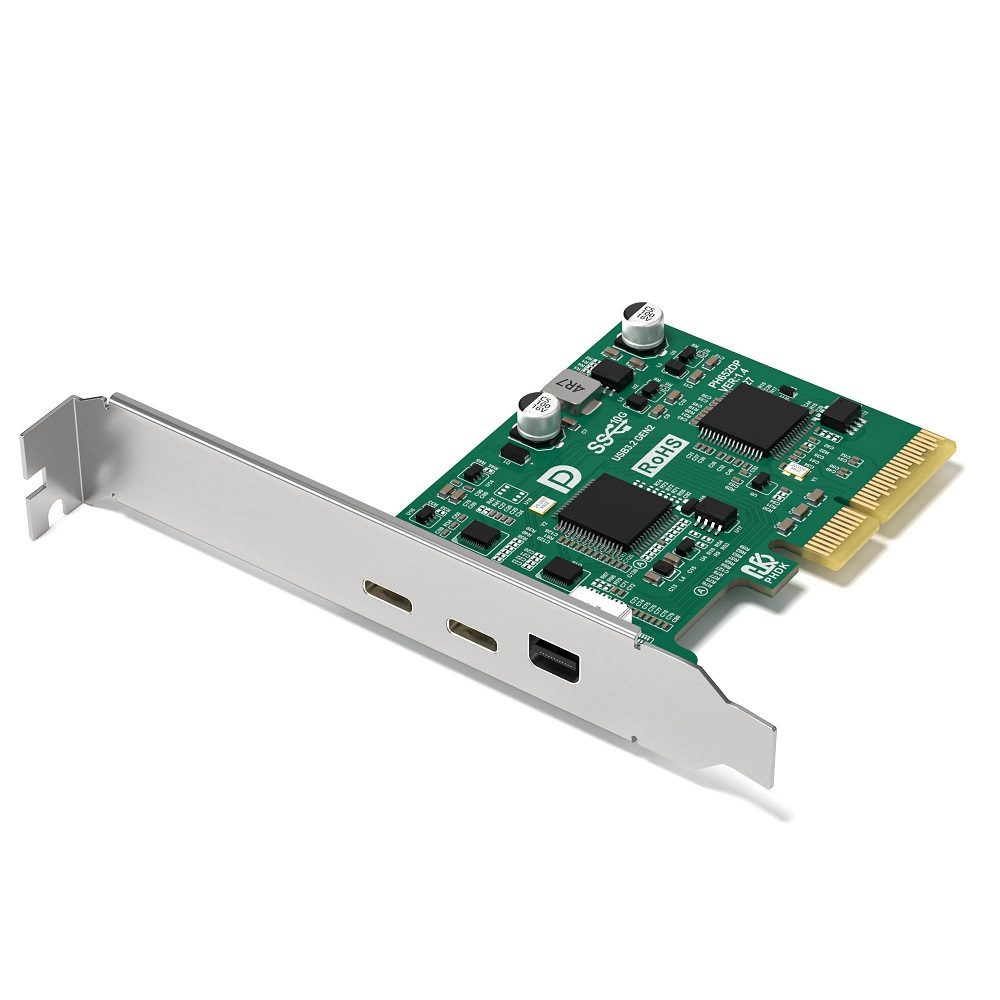
The Tittron PCIE-CV410 Fusionlink PCIe USB-C Video Output Converter Card is designed for desktop PCs and workstations, bringing high-speed USB-C connectivity and 4K video output to traditional systems. Simply install it into a PCIe slot on the motherboard, and your existing PC can be easily upgraded to meet the demands of modern peripherals. The card is equipped with two USB-C ports: one 10Gbps high-speed data port…
Käufer-Login – Preise, Bestand und Bestellhistorie
Incoterms® 2020 gelten für alle Tittron-B2B-Bestellungen.
Überblick — PCIE-CV410 PCIE-CV410 | PCIe DisplayPort Alt-Mode Host Card - Dual USB-C 10Gbps Interfaces
The Tittron PCIE-CV410 Fusionlink PCIe USB-C Video Output Converter Card is designed for desktop PCs and workstations, bringing high-speed USB-C connectivity and 4K video output to traditional systems. Simply install it into a PCIe slot on the motherboard, and your existing PC can be easily upgraded to meet the demands of modern peripherals. The card is equipped with two USB-C ports: one 10Gbps high-speed data port for external SSDs, hard drives, or card readers, and another port that supports both 4K/60Hz video output and 10Gbps data transfer. With a USB-C monitor or docking station, users can enjoy a single-cable solution, combining high-quality video with fast data transmission while keeping the workspace clutter-free.For display compatibility, the card features a miniDP 1.4 input, which converts the DisplayPort signal from a graphics card into USB-C DisplayPort Alt Mode, enabling direct connection to USB-C monitors. Whether for single or multi-display setups, the card delivers seamless performance. With support for PCIe x4/x8/x16 high-speed bandwidth, this expansion card ensures stable data transfer and reliable video output. It is particularly suitable for creative professionals such as designers, video editors, and 3D rendering engineers, as well as for researchers and enterprise laboratories that require expanded peripheral compatibility. For DIY PC builders and enthusiasts, it provides an easy way to give older platforms the benefits of modern USB-C efficiency.
Das zeichnet sie aus — PCIE-CV410 PCIE-CV410 | PCIe DisplayPort Alt-Mode Host Card - Dual USB-C 10Gbps Interfaces
- ■ Dual USB-C ports: 10Gbps data + 4K/60Hz video with data
- ■ miniDP 1.4 input for USB-C DisplayPort Alt Mode
- ■ 4K/60Hz video output for sharp and smooth display
- ■ 10Gbps high-speed data transfer for SSDs and storage
- ■ PCIe x4/x8/x16 slot compatibility
- ■ One-cable solution for video + data via USB-C monitor/doc
- ■ Compatible with Windows, Linux
Technische Daten — PCIE-CV410 PCIE-CV410 | PCIe DisplayPort Alt-Mode Host Card - Dual USB-C 10Gbps Interfaces
- Model
- PCIE-CV410
- Garantie
- 24 months
- Zertifizierung
- CE · FCC · RoHS
- OEM / ODM
- Unterstützt
DOWNLOAD — PCIE-CV410 PCIE-CV410 | PCIe DisplayPort Alt-Mode Host Card - Dual USB-C 10Gbps Interfaces
Datenblätter, Treiber und Firmware für dieses Modell sind noch nicht veröffentlicht. Kontaktieren Sie unser Team und wir senden Ihnen die benötigten Dateien.
ANGEBOT ANFORDERN
Häufige Fragen
Q1: What is the PCIE-CV410 PCIe USB-C video converter card used for?
The PCIE-CV410 is a PCIe expansion card for desktop PCs and workstations. It adds USB-C ports with 10Gbps data speed and 4K@60Hz video output, upgrading older systems to support modern USB-C monitors and peripherals. It converts GPU DisplayPort signals into USB-C DisplayPort Alt Mode via its Mini DP 1.4 input.
Q2: What ports are available on the PCIE-CV410?
It has two USB-C ports. One port supports only 10Gbps high-speed data for SSDs, hard drives and card readers. The second port supports both 4K@60Hz video output and 10Gbps data transfer. It also features a Mini DP 1.4 input from your graphics card.
Q3: Which PCIe slots can this card be installed into?
It works with PCIe x4, x8 and x16 slots on the motherboard and maintains stable bandwidth for video and data transmission.
Q4: Does my graphics card need to have a free Mini DP port?
Yes. The card’s Mini DP 1.4 input must connect to a free DisplayPort output on your GPU to carry video signals for USB-C display output.
Q5: Can it support multi-monitor configurations?
Yes. It works for both single and multi-display setups when paired with compatible graphics hardware and USB-C monitors.
Q6: What is the maximum video resolution and refresh rate?
It supports up to 4K@60Hz video output through the USB-C port using DisplayPort Alt Mode.
Q7: Is driver installation required?
Drivers are required for proper operation. Check compatibility with your operating system before deployment.
Q8: What kind of users and scenarios fit this PCIe card?
It is ideal for designers, video editors, 3D rendering engineers, researchers and enterprise laboratories. DIY PC builders can also use it to upgrade legacy desktop workstations with modern USB-C functionality.
Q9: Can I use this card only for data transfer without video output?
Yes. The dedicated 10Gbps USB-C data port works for data peripherals independent of the video signal path.
Benötigen Sie ein Angebot oder ein Eigenmarkenprogramm?
Senden Sie uns Modelle, Mengen und Zielmarkt. Wir antworten mit Preisen, Lieferzeit und Zertifizierungsdetails.