
Tittron PCIE-CV410: DP Alt Mode USB-C PCIe Card for 4K@60Hz Desktop Video
Most desktop PCIe USB-C cards cannot output video — PCIe carries USB data, not GPU display signals. PCIE-CV410 adds a DP input for true DP Alt Mode at 4K@60Hz.
Prodotti menzionati PCIE-CV410 | PCIe DisplayPort Alt-Mode Host Card – Dual USB-C 10Gbps Interfaces
If you have ever tried adding a USB-C port to a desktop PC with a PCIe expansion card, you may have met a familiar frustration: a laptop’s USB-C port drives a USB-C monitor with a single cable, while a brand-new PCIe USB-C card happily handles SSDs and peripherals but refuses to send any picture to the display.
Why most desktop PCIe USB-C cards cannot output video
DP Alt Mode — the technology that carries video over USB-C — requires a native video signal from the graphics card.
Inside a laptop, the GPU’s display lines are routed on the motherboard straight to the USB-C port. No extra cabling is needed, which is why one cable does everything.
A standard desktop PCIe USB-C card only connects to the PCIe bus. PCIe carries USB data, but it does not carry video signals from the graphics card. There is no physical path feeding display output to the USB-C connector, so the card transfers data and power but cannot output video.
Two different ways to carry video over USB-C
A USB-C shape does not automatically mean video-out capability. There are two completely different ways to get a picture over USB-C:
- DP Alt Mode: carries the GPU’s native DisplayPort signal. Low latency, no special driver, full image quality — this is the one-cable laptop solution, and it requires a direct DP signal path.
- DisplayLink: encodes video into USB data packets. It works on any USB port, but it needs dedicated drivers and adds latency. This is not DP Alt Mode.
Most entry-level PCIe USB-C cards implement plain USB 3.2 data only, with no DisplayPort input circuit at all. Connect a USB-C monitor and there is simply no video source to send.
To make DP Alt Mode work on a desktop add-in card, the board needs an extra input for the GPU’s DisplayPort signal. That is exactly what the Tittron PCIE-CV410 is built for.
Introducing the Tittron PCIE-CV410
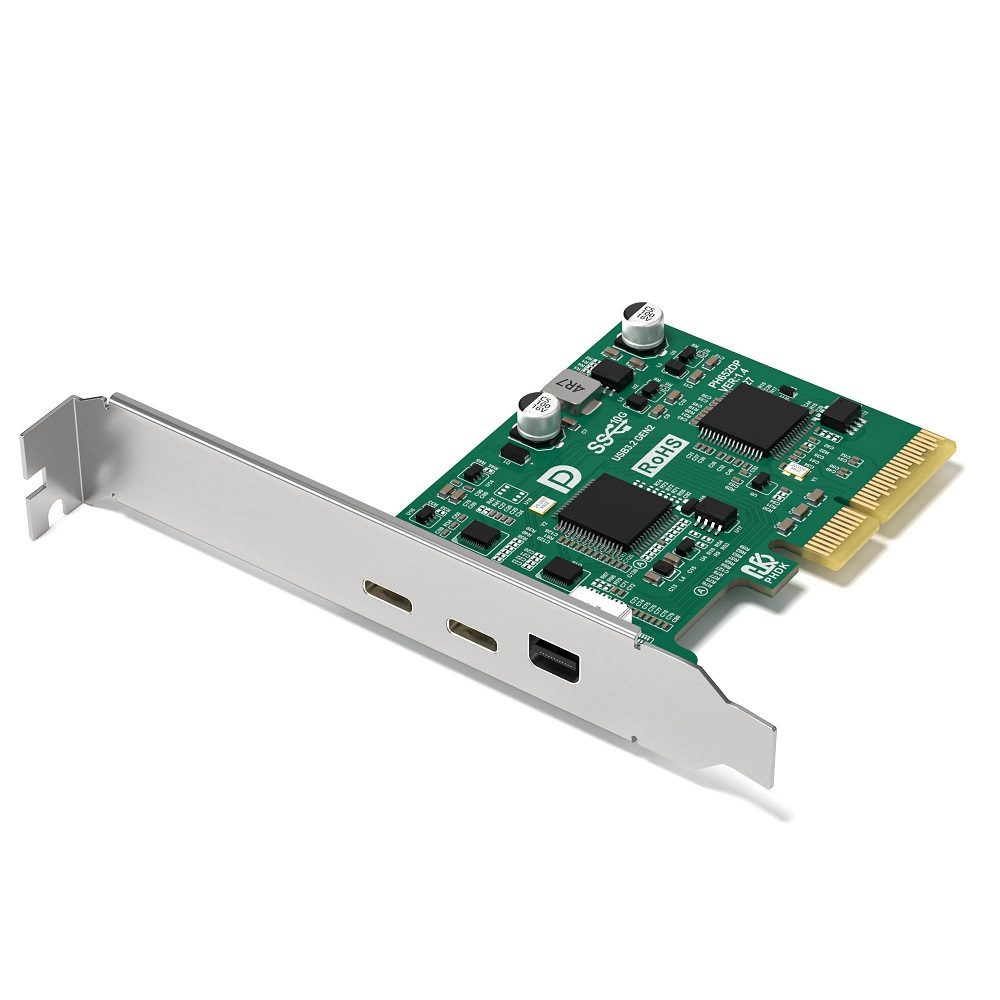
PCIE-CV410 is a PCIe expansion card designed to bring real DP Alt Mode to desktop computers. It provides two USB-C ports:
- Port 1: 10 Gbps USB data only
- Port 2: DP Alt Mode ready — 4K@60Hz video plus 10 Gbps data over one cable
A short internal miniDP cable is included in the package. Connect it from a free DisplayPort output on your graphics card to the PCIE-CV410, and the card receives the native GPU video signal.
Important: without the miniDP cable connected, the second USB-C port works for 10 Gbps data only — no video. With the miniDP cable connected, that same port carries 4K video and USB data through a single cable.
Who is PCIE-CV410 for?
- Content creators and video editors working on USB-C monitors
- System integrators building multi-screen workstations
- PC builders who want a clean one-cable desktop setup
- Companies upgrading existing desktops without replacing the whole PC
Core features
- DP 1.4 Alt Mode, up to 4K@60Hz video output
- Dual USB-C ports with 10 Gbps data bandwidth
- Fits PCIe x4 / x8 / x16 slots
- Native GPU DisplayPort signal — no additional video driver required
- Low-profile single-slot design that fits most PC cases
Simple setup steps
- Insert PCIE-CV410 into an available PCIe slot on the motherboard
- Connect the included miniDP cable between the graphics card’s DP output and PCIE-CV410
- Plug the USB-C monitor or docking station into the DP Alt Mode USB-C port
- Power on the PC and start working
FAQ
Do I need to install video drivers? No. Video uses the graphics card’s native DisplayPort signal; only standard USB drivers are needed for data transfer.
Can I use PCIE-CV410 without the miniDP cable? Yes, but for USB data only — video output will not function.
What kind of graphics card works with it? Any GPU with an available DisplayPort or miniDP output.
Summary
Laptops get DP Alt Mode video because the display traces are built into the mainboard; standard desktop USB-C PCIe cards lack that video path. Tittron PCIE-CV410 closes the gap with a dedicated DisplayPort input, so a desktop can finally drive a USB-C monitor with one cable.
Vuoi i dettagli di un annuncio?
Indicaci quale gamma o progetto ti interessa e ti risponderemo con specifiche, campioni e tempi di consegna.